Ways of Fetching Data (Data Fetching) with Next JS

I can't find much Turkish documentation about Next JS on the internet. It feels like the only source is Next JS's own documentation. Yes yes, I know, we're developers, we have to know English. Fine for those parts, but a person also wants to taste the logic topics in their own language, come on.
In this article, we'll take a look at Next's Data Fetching topic, which confused me the most and where I made the most mistakes when I started with Next.
Once you fully grasp the topic, choosing which page should work how with Next becomes a lot of fun.
As you know, Next is different from React on this topic. (By React here I mean react-cli.) React only gives you client-side rendering (rendering data on the browser (client) side). But Next provides many data fetching ways. These are basically as follows:
- SSR: Server-Side Rendering
- SSG: Static-Site Generation
- CSR: Client-Side Rendering
Yes, any developer who has looked at Next even a little knows that Next runs on the Server-Side. But if Next runs Server Side by default, why do we have to use these methods?
Next automatically generates only the JSX we create, that is, the HTML documents and static code, on the server side. If we fetch data from an external API and want your data to be generated on the server side, we have to use these methods. Otherwise, Next will only compile the code you wrote statically on the server side.
If a question like "So what disadvantage could this have?" came to our minds, it leads to a very basic question like "Why is Server Side Rendering needed?" I recommend you research this part yourself.
CSR: What Is Client Side Rendering?
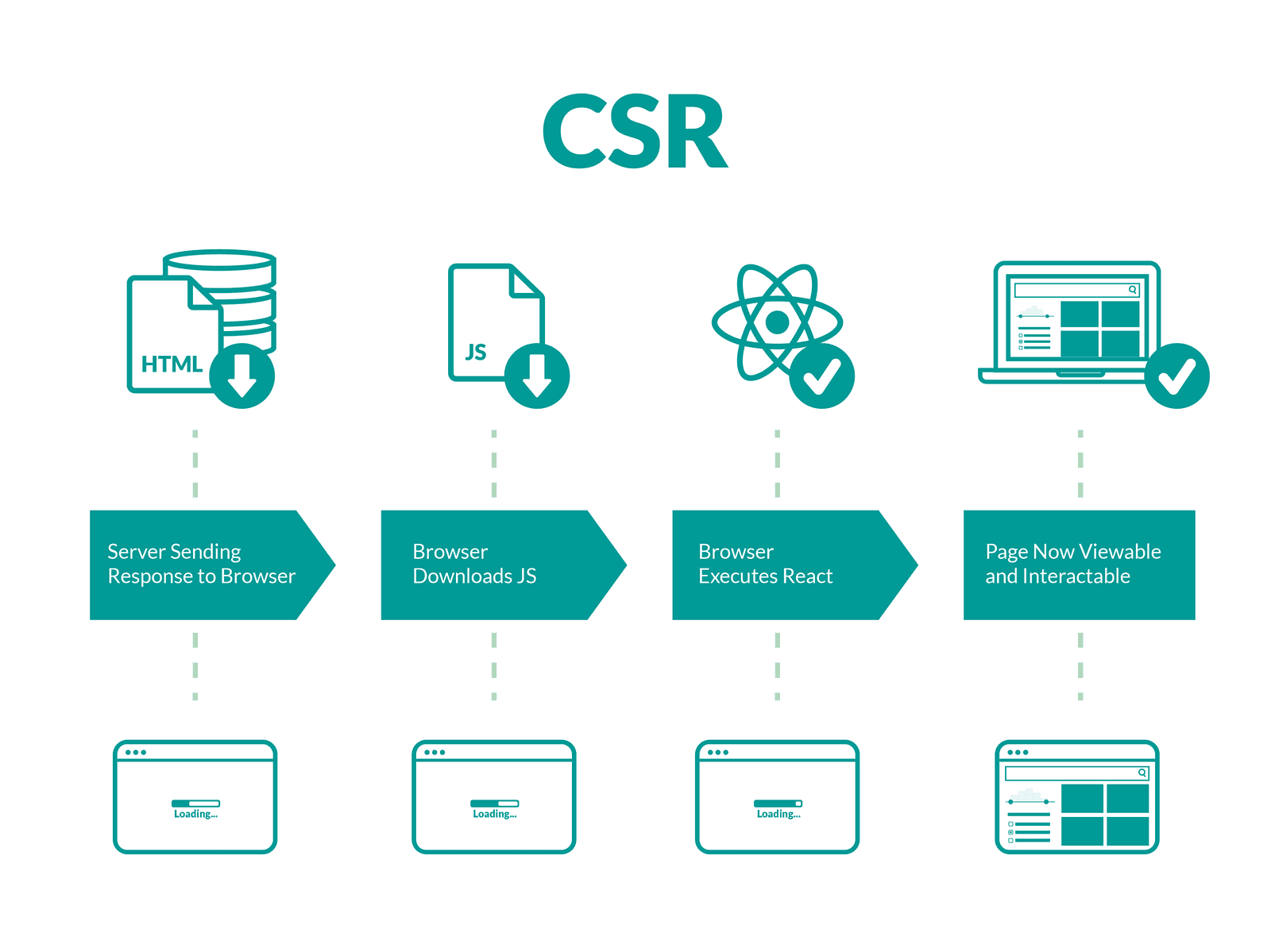
I wanted to start with the part all React lovers are already used to :) As the name suggests, this part has no connection with the Server side. Your data arrives at runtime. You generate your data entirely on the Client, that is, the Browser.
Client-Side Data Fetching with UseEffect
On the Client-Side, our most popular data fetching method is of course the useEffect hook.
function Profile() {
  const [data, setData] = useState(null);
  useEffect(() => {
    fetch("/api/posts")
      .then((res) => res.json())
      .then((data) => {
        setData(data);
      });
  }, []);
  return (
    <div>
      <h1>{data.title}</h1>
      <p>{data.description}</p>
    </div>
  );
}
Isn't this already very familiar? "Familiar" falls short, we can say "identical." Now let's look at the unfamiliar one.
Client-Side Data Fetching with useSWR
If we look at Next's documentation too, if we've chosen to fetch data on the Client Side, the Next team strongly recommends that we use the useSWR hook instead of useEffect. The reason is that, unlike useEffect, the useSWR hook handles many aspects of the fetched data such as caching, revalidation, focus tracking, refetching on interval, etc. If this part sounds complicated, let's put it briefly like this: "More performant".
useSWR's most distinctive feature is automatic caching, and it's very simple to use:
import useSWR from "swr";
const fetcher = (...args) => fetch(...args).then((res) => res.json());
function Profile() {
  const { data, error } = useSWR("/api/posts", fetcher);
  return (
    <div>
      <h1>{data.title}</h1>
      <p>{data.description}</p>
    </div>
  );
}
Inside the useSWR hook, we do nothing other than call the API. The first parameter represents the API path, and the second one represents the callback. By the way, I think it's simpler than useEffect, but it's up to you :)
SSR: What Is Server-Side Rendering?
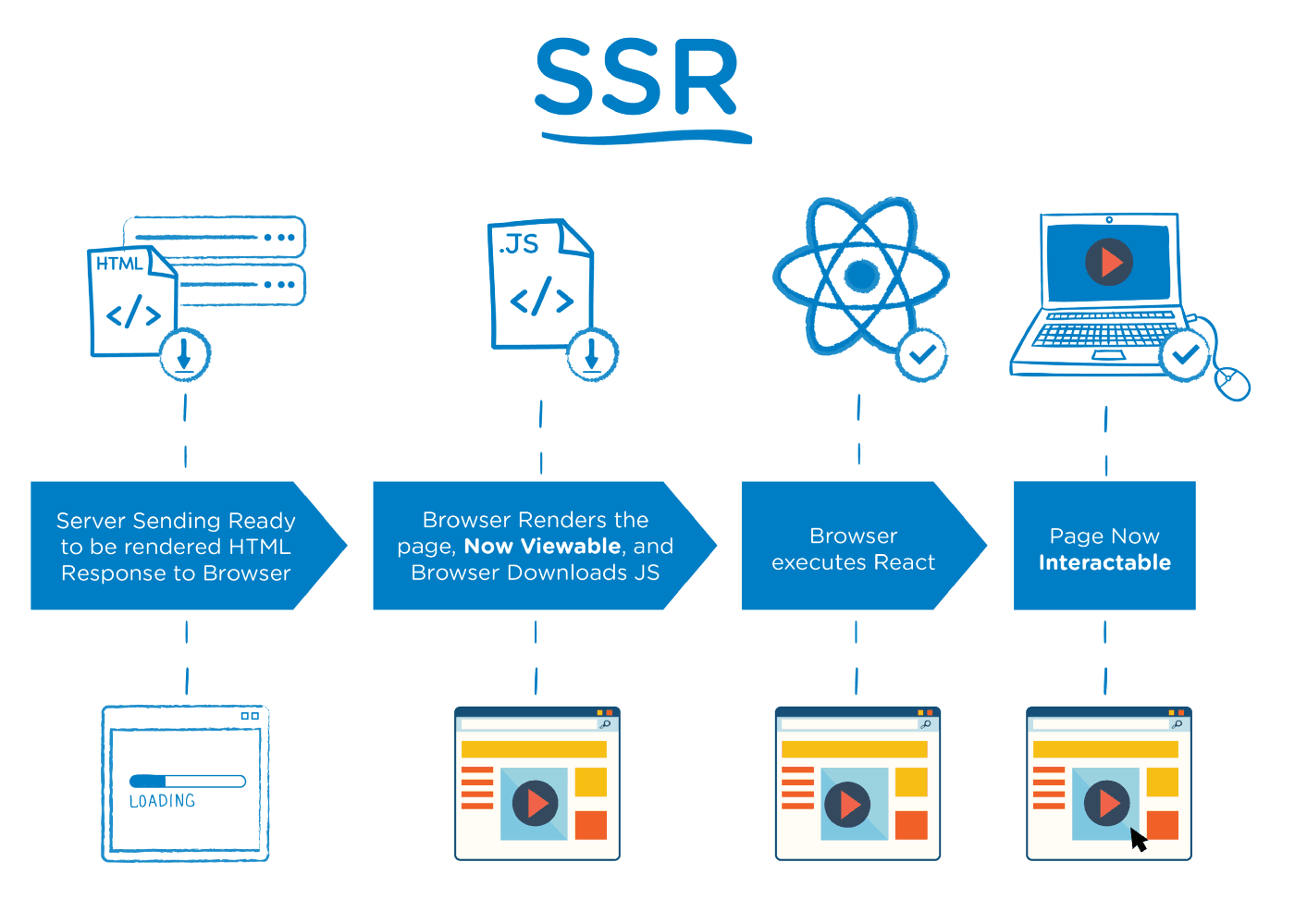
We've arrived at the famous topic. The topic that people starting any Javascript library begin to wonder about at most 1 month later. What on earth is this Server-Side? If we want search engines to read the content on our site cleanly (we call this SEO compatibility), we must fetch our data Server-Side.
Note: We all know Google's indexing and search power. Even if you create a normal React project, Google can index your site to a certain extent. But this level is not enough for a site that needs SEO.
If we want to fetch our data server side with Next, we create a function named getServerSideProps inside our page:
Path: src/page/index.js
export async function getServerSideProps(context) {
  return {
    props: {}, // sayfaya iletilecek props'ları burada döndürüyoruz.
  };
}
We'll make our HTTP Request inside this function and return it to the page via props:
function Homepage({ data }) {
  // döndürülen props'u page'imizin fonksiyonunda kendi ismiyle tanımladıktan sonra kullanabiliriz.
}
// Her sayfa isteğinde çağrılır.
export async function getServerSideProps() {
  // Harici API çekme işlemi
  const res = await fetch(`https://.../data`);
  const data = await res.json();
  // Çekilen data props içerisinden return ile döndürülür.
  return { props: { data } };
}
export default Page;
When does getServerSideProps run?
Learning how to write it is easy, just 5 minutes. But if we don't learn well how it works, we can get burned badly.
Definitely don't forget the following:
The getServerSideProps function never runs on the browser side. It always runs on the server side. It generates the data on the server side and passes it to the Browser side.
getServerSideProps automatically passes the data to the page as JSON. For this, we don't need to do anything other than define our props in our page's function.
The getServerSideProps function can only be exported from pages. You can't use it inside any component.
The getServerSideProps function is an independent function. Yes, we'll define it inside our page file, but we can't call it inside our page's function. We need to export it separately.
So when should I use getServerSideProps?
Here we need to pay close attention to this: "Not every page has to run Server Side." Generating our data Server Side on a page that doesn't need SEO means wasting resources.
For example, on Instagram, the "Saved" page, which is specific to the user, doesn't need to be generated server-side. Because indexing this page in a search engine gives us no benefit.
SSG: What Is Static-Site Generation?
The data fetching — generation method that keeps coming up in Next's documentation, that I was too lazy to look into with a "what the heck is this", but that is actually extremely important to learn.
In short, the logic is this: The getStaticProps function is also for generating our page on the server side, but unlike getServerSideProps, it generates the page at build (compile) time.
This is more performant than getServerSideProps. Because before the user even enters your page, that page has already been generated at build time and is ready. In getServerSideProps, the generation process starts as the user enters the page.
Its usage is the same as getServerSideProps:
When does getStaticProps run?
getStaticProps runs on the server side, just like getServerSideProps. It never runs on the client side. The only difference is that it runs at build time. That is, before the user enters the page, the page has already been generated.
So when should I use getStaticProps?
In every case where no user input is required, Static-Side Rendering makes more sense. Since the page is generated before the user enters, it is more performant.
Where can I use getStaticProps?
Here too, the situation is the same as with getServerSideProps. getStaticProps only works inside pages. You can't run it inside '_app', '_document' or '_error'.
One of the reasons for this restriction is that React needs to have all the necessary data before the page is rendered. In short, the data must be passed to the Browser before the page is generated.
getStaticProps is an independent function and can't be written inside the page's function. It's written separately.
//Sayfa fonksiyonu
function Homepage() {
  return ();
}
//getStaticProps fonksiyonu
export async function getStaticProps() {
  return {
    props: {},
  };
}
export default Blog;
Next's data fetching methods are of course not limited to these. In this article I wanted to talk about them in general terms. We'll cover them in detail in later articles.
function Blog({ posts }) {
  return (
    <ul>
      {posts.map((post) => (
        <li>{post.title}</li>
      ))}
    </ul>
  );
}
export async function getStaticProps() {
  const res = await fetch("https://.../posts");
  const posts = await res.json();
  return {
    props: {
      posts,
    },
  };
}
export default Blog;