A Workflow That Will Seriously Reduce Hitting Cursor Usage Limits, in 10 Minutes
First of all, this post is not for people who go around saying “AI does everything now, we don't need developers anymore,” and who think they're building products just by writing prompts without understanding even the most basic problem of the technology they use.
This post is for developers who read documentation for hours, try to understand why the framework they use exists, question their own architecture before blaming the Agent for an error, and see AI not as a “magic wand” but as a teammate that boosts their technical productivity.
Someone who does vibe coding has to accept whatever the Agent says. If the model changes the wrong file, they can't notice. If it builds the wrong abstraction, they can't tell. If it eats unnecessary context, they can't stop it. Their tokens burn, the project bloats, the errors grow.
But for a developer who knows their technology, AI is something else entirely.
They give it the right context. They draw the right boundary. They catch the wrong output. They make the Agent plan, steer it, and stop it when necessary.
So the question is not “Will AI put developers out of work?”
AI will sink those who don't know what they're doing faster, and make those who do know what they're doing much more powerful.
In this post I'll walk through a workflow you can apply to avoid wasting tokens while using Cursor, use the Agent in a more controlled way, and manage the AI-assisted development process like a real developer.
AI code editors give you incredible speed, but when used without control they burn tokens very fast.
If you use an AI-powered editor like Cursor in particular, you probably know this feeling.
You're working on a feature. You give the Agent a few prompts. Then you look and see that the same files have been read over and over, the context has bloated, the model has explained the same thing many times, it has gone down the wrong path a few times, and without you noticing most of your usage allowance is gone.
For me, the real turning point was this:
Cursor wasn't working badly.
I was using Cursor wrong.
Because what exhausts limits in AI editors is usually not “asking too many questions.” What is really expensive is having code written with the wrong context, running the agent without a plan, having the same work redone from scratch several times, and constantly pulling unnecessary files into the context.
In this post I'll describe a practical workflow you can apply to spend fewer tokens, get cleaner output, and use the Agent in a more controlled way while using Cursor.
I'll explain this through Cursor, but naturally the post is also valid for those who use Claude or Antigravity. So don't get hung up on the “Cursor” part. Whichever one you apply these methods to, you'll get the same result.
Of course these methods won't eliminate the limits. But if you use Agents more consciously, you can finish the same work with far fewer attempts, less context bloat, and less model usage.
1. Have It Make a Plan Before Writing Code
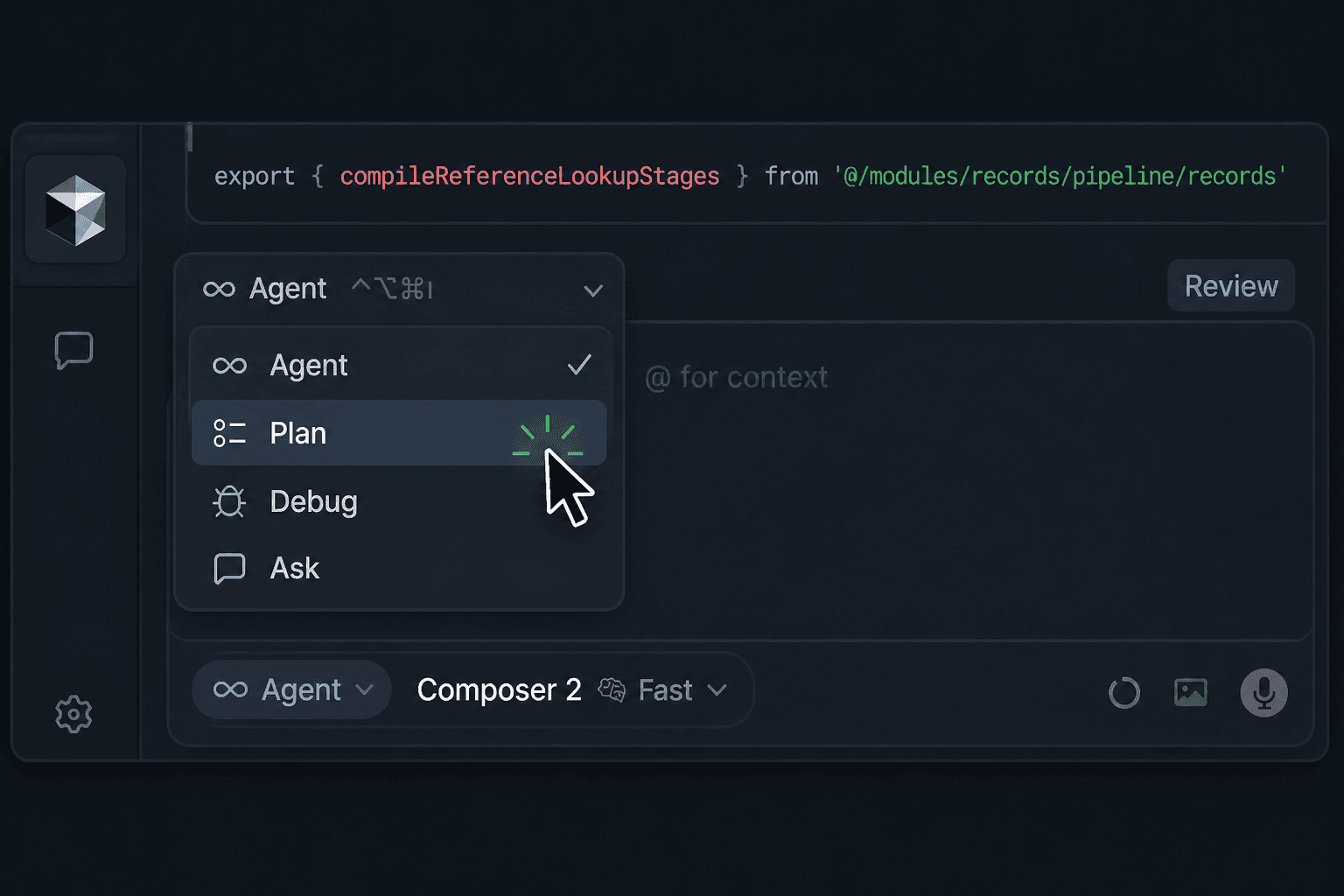
This sometimes works for small changes. But for things like a new feature, a refactor, an auth system, a dashboard structure, a payment integration, RBAC, or a database schema change, having it write code directly usually turns out expensive.
Because if the Agent makes a wrong assumption the first time, you then send 5–10 more prompts to fix it. Meanwhile the old context grows, files are re-read, code is changed again, and token usage multiplies.
One of the powerful methods Cursor itself recommends is using Plan Mode. In Plan Mode, the Agent doesn't write code right away; it first researches the codebase, finds the relevant files, asks you for clarification if needed, and then produces an actionable plan.
The practical flow I recommend is this:
Don't write code first.
Examine the existing codebase for this feature. Extract the relevant files, existing patterns, and risky points. Then give me an actionable plan.
The plan should include:
- Which files will change?
- Which new files will be added?
- What will the backend/frontend split be?
- Is there a database or API change?
- What are the risky points?
- What are the test or manual verification steps?
Don't write code until I approve.
This prompt looks simple, but it seriously changes how you use Cursor.
Because the Agent is no longer an “instant producer” but first becomes an “analyst.”
Remember this especially in big projects:
An Agent without a plan behaves like a junior developer. An Agent with a plan behaves like a teammate who has been given a technical task.
2. Don't Load a Big Job Into a Single Prompt
Agents have become very advanced and powerful now, so it's tempting to have them do everything in one go.
For example:
Set up an RBAC system, add admin/editor/viewer roles, build a management panel in the UI, adjust the MongoDB schema, add permission checks, write middleware, filter the sidebar by role.
This isn't a bad prompt, but it's too big for a single shot. If a very powerful agent like Opus or Sonnet is selected, you might even get something satisfying.
However, a prompt like this forces the Agent to think about Database schema, Backend auth, UI state, Form validation, edge cases, etc. all at the same time.
Context this large both increases the chance of errors and bloats token usage.
Instead, split the work:
Stage 1: Only analyze the existing auth and project access structure. Don't write code.
Stage 2: Produce the proposed MongoDB schema design for RBAC. Don't write code.
Stage 3: Only add the backend permission middleware.
Stage 4: Only build the skeleton of the role/permission management screen in the UI.
Stage 5: Filter the sidebar and route access by role.
Stage 6: Finally, review all the changes and list the missing security points.
The goal here is not to slow down.
On the contrary, it's to prevent the Agent from changing 30 files in the wrong direction.
The basic rule of working efficiently with an Agent is this:
Split big work into small, verifiable pieces. Read the diff at the end of each piece. Then move on to the next step.
3. Don't Keep Using Long Chats
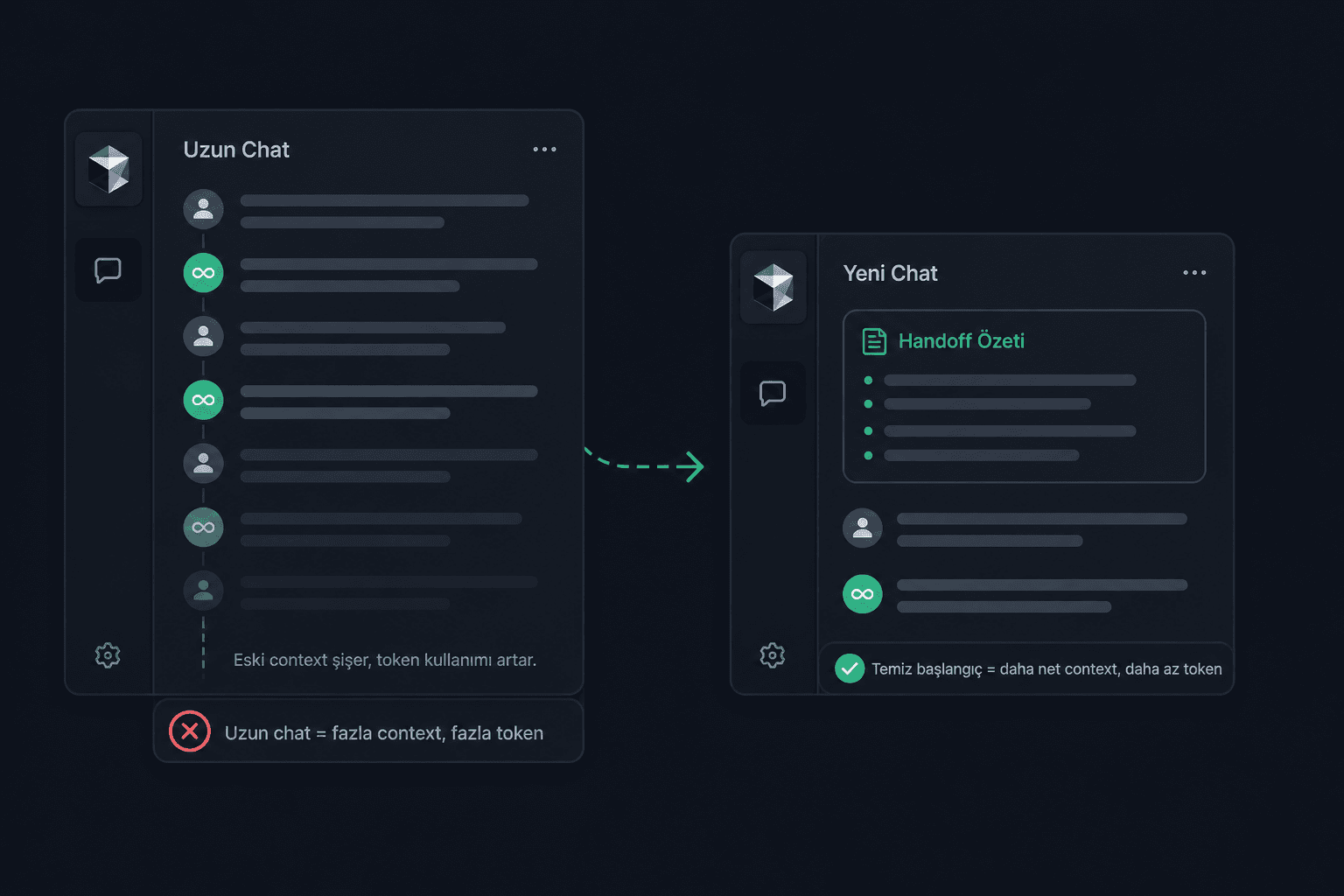
Long conversations in the same chat are silent token killers.
When you keep going in the same Agent chat for hours, the model starts carrying the old context over and over. At first it seems to work, but after a while two problems appear:
First, token usage goes up.
Second, the model's attention gets scattered.
Old decisions, abandoned ideas, changed files, and explanations that are no longer valid can all still remain in the context.
So instead of continuing a long Agent conversation forever, you should make a clean start at certain points.
The method I use:
I'm going to continue this session in a new Cursor chat.
Prepare for me a handoff prompt that summarizes the current and still-valid information in this conversation.
Include the following:
- The purpose of the project
- Changes made
- Technical decisions taken
- Files changed
- Where to continue
- Risks to watch out for
- Decisions that are no longer valid
Then open a new chat and paste this handoff prompt.
This method both cleans the context and keeps the Agent from getting distracted by unnecessary old details.
The rule is simple:
If a chat has gotten too long, don't use it like “memory.” Take a summary and move to a new chat.
4. Don't Explain the Same Things Over and Over — Use Cursor Rules
Most of the token waste in Cursor comes from repeating the same instructions constantly.
For example, if you write these every time:
Use TypeScript. Write clean code. Follow the existing folder structure. Don't make unnecessary abstractions. On the MongoDB side, watch the ObjectId relationships. We use the Next.js App Router. On the Expo side we use styled-components.
Instead of writing these in every prompt, you should use Cursor Rules.
The structure I recommend:
.cursor/ rules/ project-architecture.mdc code-style.mdc backend-rules.mdc frontend-rules.mdc ai-workflow.mdc
An example project-architecture.mdc:
Project Architecture Rules
- Follow the existing folder structure.
- Before creating a new folder, check whether a similar pattern exists.
- Don't create unnecessary abstractions.
- Split large files into small but meaningful pieces.
- Don't bury business logic inside UI components.
- Keep the API, service, validation, and UI layers separate.
- Examine the relevant existing files before writing code.
- Don't make assumptions where you're unsure; produce a plan first.
An example ai-workflow.mdc:
AI Workflow Rules
- For big changes, give a plan first; don't write code right away.
- List the files that will change in the plan.
- Give a short summary after each change.
- State potential risks after writing code.
- If there is a linter/tests, suggest running them or run them.
- If you're trying to fix the same problem for the third time, stop and reevaluate the approach.
Once you set this up, every prompt gets shorter.
More importantly, the Agent doesn't behave as if it's coming to the project from scratch every time.
5. Set Up a “Memory Bank” System
Cursor Rules are good for static rules.
But as the project progresses, some decisions change:
- This project will now use Redux Toolkit.
- The auth middleware changed.
- The old API structure became deprecated.
- Some technical debts will be resolved later.
- Zod will now be used for form validation.
- New components will be written on top of the existing design system.
Because a decision you make in one Agent chat in Cursor may not be automatically remembered in another chat you open anew. That's why adding a small Memory Bank file to the project is very useful.
Structure:
docs/ memory.md
An example memory.md:
Project Memory
Last updated: 2026-05-04
Project Summary
This project is a web application built with React, TypeScript, and Node.js.
The project consists of two main parts:
- Frontend: React application
- Backend: Node.js API
The main goal is to keep the codebase simple, readable, and easy to maintain.
Current Architecture
- Frontend components are kept under
src/components. - Page-level screens are kept under
src/pages. - Shared utility functions are kept under
src/utils. - API request functions are kept under
src/services. - Backend routes are kept under
server/routes. - Backend business logic is kept under
server/services.
Active Technical Decisions
- TypeScript must be used in all newly written code.
- Functional components must be used on the React side.
- Components must be kept small and focused.
- Business logic must not be written directly inside UI components.
- Service functions must be used for API calls.
- Zod should be preferred when new validation logic is needed.
- Simple functions should be preferred over unnecessary abstractions.
Structures That Should Not Be Used / To Be Avoided
- Don't create new class-based React components.
- Unless it's a very small case, don't put business logic inside page components.
- Don't add a new state management library without asking first.
- Don't rewrite existing working code from scratch unless the task requires it.
- Don't change the folder structure without explaining why.
Work in Progress
- The user settings page is being improved.
- The form validation structure is being standardized.
- Some old API calls still need to be moved under
src/services.
Known Issues
- Some components are too large and may need to be split up in the future.
- Error messages in forms are not fully consistent.
- Some API functions still return loosely typed responses.
AI Instructions
Before making a big change:
- Read this file.
- Examine the relevant existing files.
- Explain the existing pattern.
- Propose a short plan.
- Wait for approval before editing a large number of files.
When an important technical decision changes, suggest updating this file.
A prompt to have the Agent create memory.md:
I want you to create a Memory Bank file for this project.
First examine the codebase but don't write code.
Analyze the following:
- What is the general purpose of the project?
- What are the main technologies used?
- What is the folder structure like?
- Is there a frontend/backend split?
- What are the important architectural patterns?
- What are the recurring code-writing habits?
- Are there any deprecated or legacy structures to watch out for?
- What rules should be followed when writing new code?
Then propose a clean and up-to-date content for the docs/memory.md file.
The file should include these sections:
- Project Summary
- Tech Stack
- Current Architecture
- Active Technical Decisions
- Deprecated / Avoid
- Current Work In Progress
- Known Issues
- AI Instructions
Important:
- Don't make assumptions.
- Mark places you're unsure about as "Unknown" or "Needs confirmation".
- Don't write unnecessarily long.
- This file will be used so the Agent can understand the project faster.
- Don't change code, only propose the content of
docs/memory.md.
After a feature is completed or an architectural decision changes, you can also use this prompt:
Based on the latest changes we made, do we need to update the docs/memory.md
file?
First read the existing docs/memory.md file.
Then examine the latest changes.
Tell me:
- Which information is still correct?
- Which information has changed?
- Is there a new technical decision that needs to be added?
- Is there anything that needs to be added to the Deprecated / Avoid section?
- Does the Known Issues section need updating?
Give a suggestion first. Don't change the file until I approve.
6. Keep Codebase Indexing Clean
The Agent's power comes from the codebase context.
But if the codebase context is dirty, the Agent thinks dirty too.
Especially in large projects, indexing unnecessary files both weakens search and makes context management more expensive.
Cursor supports controlling which files can be accessed or which files won't be indexed with .cursorignore and .cursorindexingignore files -> Docs
The starting .cursorignore or .cursorindexingignore logic I recommend:
node_modules .next dist build coverage .expo .turbo .cache .env .env.* *.log
package-lock.json
yarn.lock
pnpm-lock.yaml
What you need to pay attention to here is this:
Lock files may sometimes be necessary. But in most feature-development prompts, the Agent doesn't need to deal with package-lock.json or huge build outputs.
In large projects you can also do this:
docs/archive legacy tmp generated
Of course, you must make sure you're not excluding files that are really needed.
The cleaner the context you give Cursor, the less nonsense the Agent produces.
7. Don't Use the Most Powerful Model for Everything
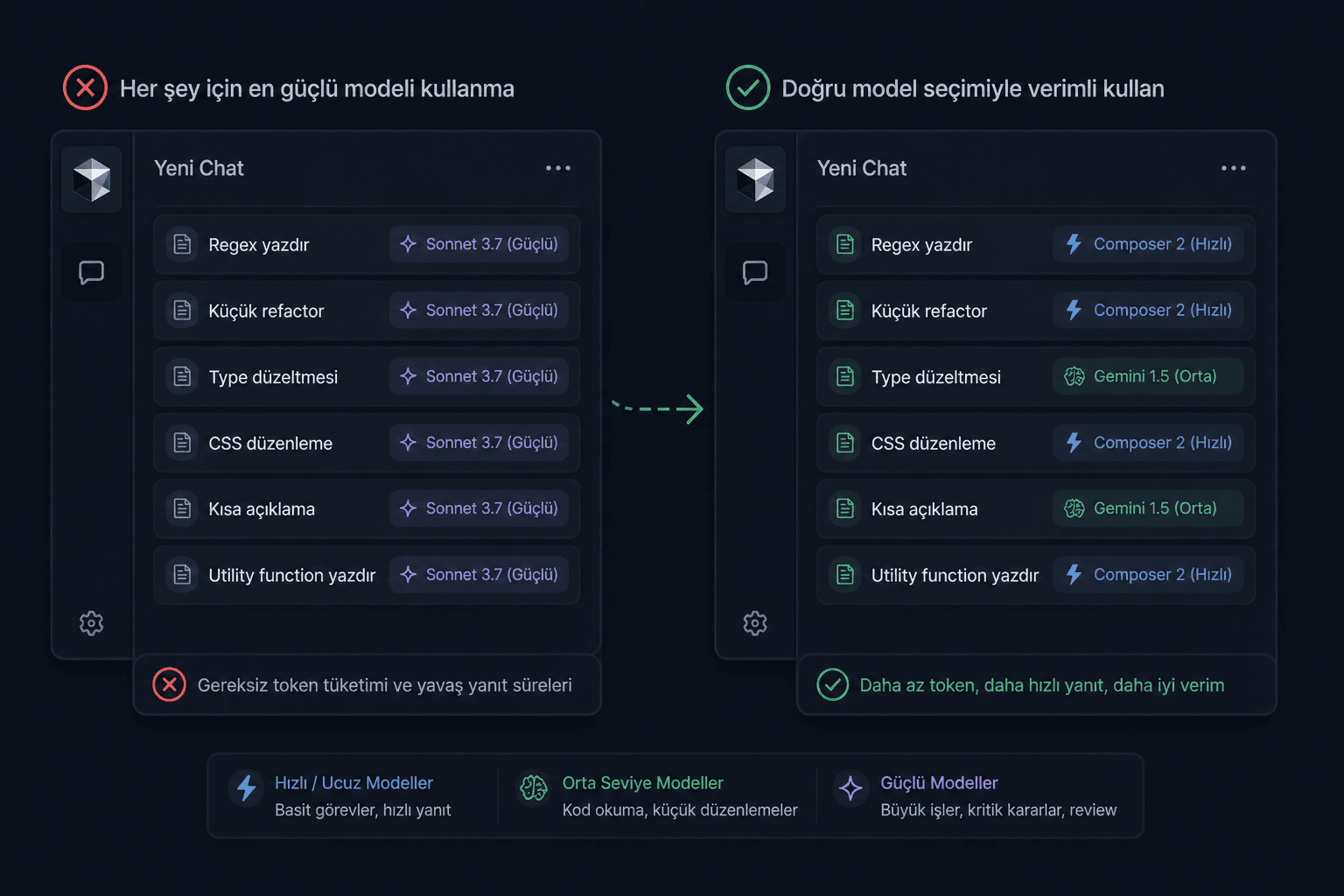
One of the nicest things about Cursor is that you can use different models inside the same editor.
But using the most powerful model for every job is usually a waste.
You don't need a powerful model for simple tasks:
- Having it write a regex
- A small component refactor
- A simple TypeScript type fix
- Editing CSS classes
- Asking for a short explanation
- Having it write a small utility function
A cheaper or faster model may be enough for these. In my experience, composer 2 can handle small improvements like these cleanly with a good prompt.
Use the powerful model for these:
- Big architectural decisions
- Multi-file refactors
- Critical bug analysis
- Risky work like auth, permissions, payment
- Database schema changes
- Near-production code review
My practical breakdown for model usage is as follows:
Simple question / explanation: Cheaper or faster model (composer 2)
Code reading / small edits: Mid-level model (gemini, composer)
Big feature / refactor / critical decision: Powerful model (sonnet, opus)
Final review: Powerful model (sonnet, opus)
So instead of burning the powerful model from start to finish, save it for final quality control and hard decisions.
8. Use MCPs Only as Much as Needed
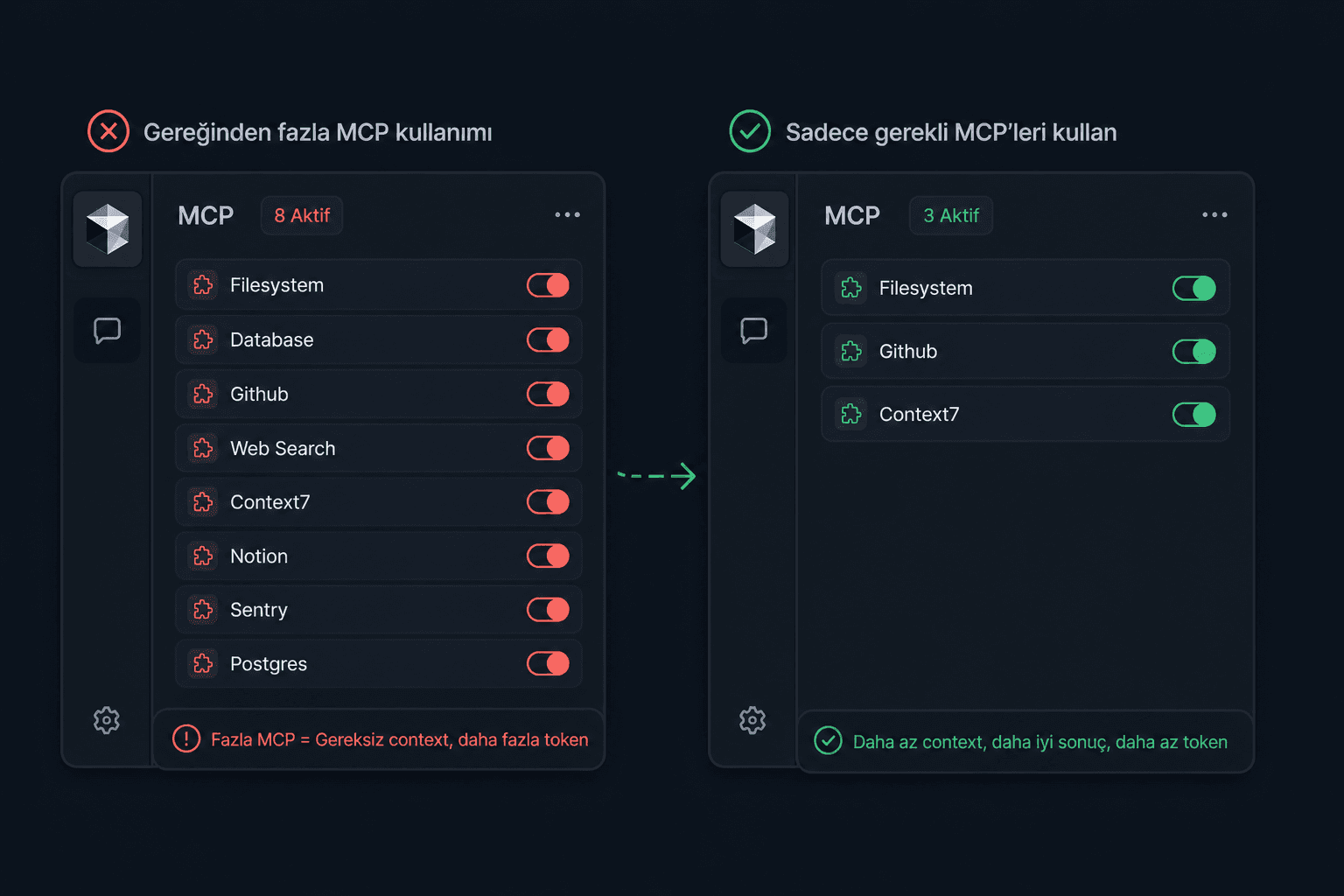
MCP is a very powerful system for connecting Cursor to external tools.
For example, you can connect GitHub, PostHog, a database, documentation, an issue tracker, or other services to Cursor.
But enabling every MCP is not a good idea.
Because every additional tool widens the Agent's decision space. Misconfigured MCPs can lead to unnecessary context, unnecessary tool calls, and more complicated answers.
On the MCP side, Cursor has also shared that it tries to reduce static context with dynamic context discovery, along with a test result showing reduced total agent token usage in the condition where MCP tools are used. This is a good development, but you still need to set up MCPs deliberately.
My recommendation:
Start with a maximum of 2–3 really necessary MCPs in each project.
For example:
- GitHub MCP
- PostHog MCP
- Docs/Context MCP
If you use a Database MCP, don't give production access. Limit it to read-only or a local/dev environment.
A safe prompt example for MCP:
Don't call MCP tools unless necessary. First examine the local codebase. Use external tools only if the existing context is insufficient. Don't perform write operations on production data.
9. Give the Agent a Test and Linter Target
The biggest problem with Agents is this:
The output sometimes looks right but doesn't work.
Cursor's own best practices article also recommends giving Agents verifiable goals and using typed languages, linters, and tests.
So instead of saying “do this,” it's better to say “do this and run it through these checks.”
Example:
After making this change:
- Check whether there are TypeScript errors.
- Check whether the relevant route/component compiles.
- If there are existing tests, run them.
- If there are no tests, write out manual verification steps.
- Also list the places you consider risky.
This may seem to increase tokens, but in the long run it reduces them.
Because having it checked the first time is cheaper than fixing broken code 5 prompts later.
10. Don't Let the Agent Fall Into an Infinite Loop
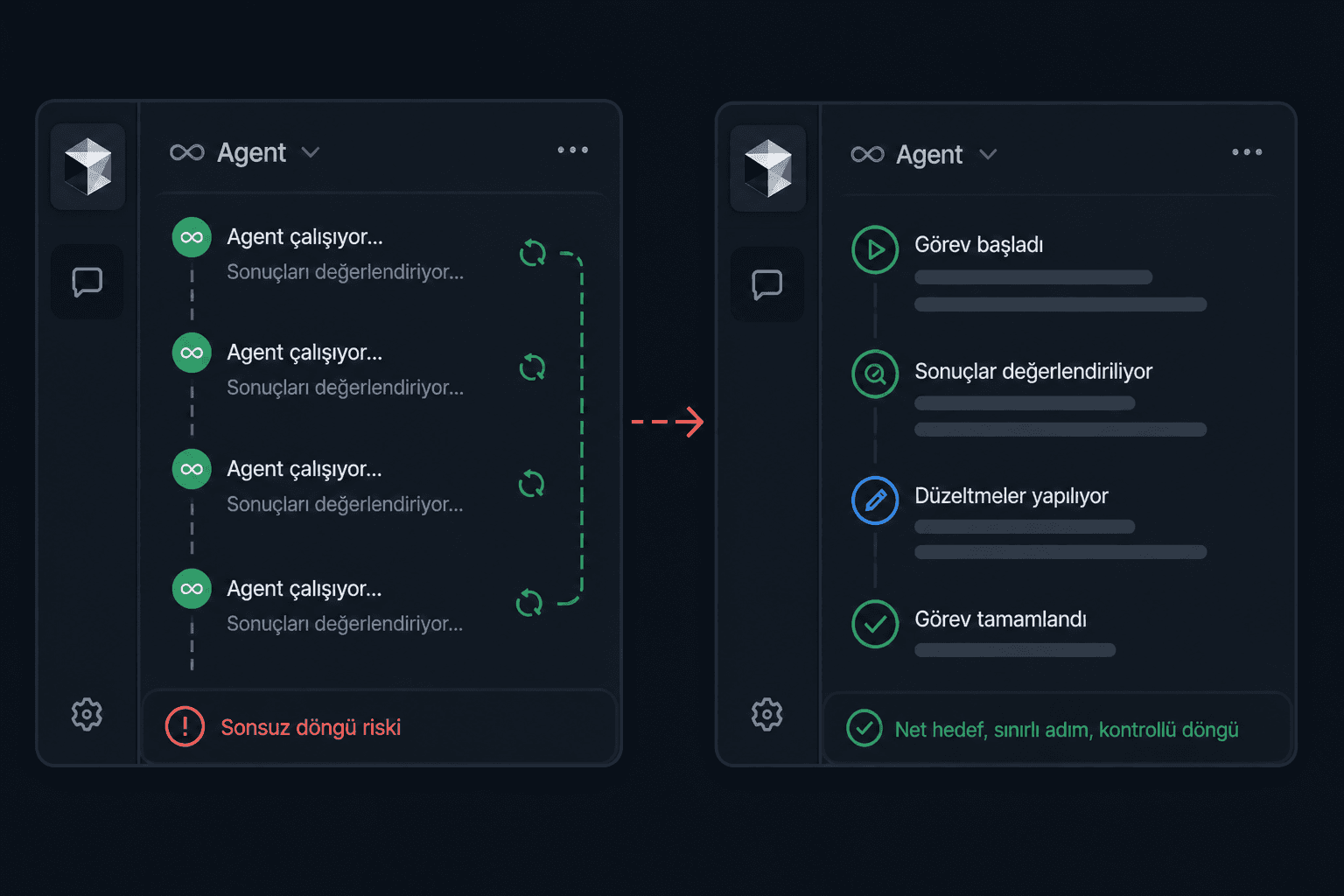
Sometimes the Cursor Agent tries to fix the same error over and over.
A loop like this forms:
- It writes code.
- It gets an error.
- It changes something.
- Another error appears.
- It breaks the previous fix.
- It tries again.
- It gets even more tangled.
Continuing at this point means burning tokens.
My rule:
If the Agent can't solve the same problem twice, stop it on the third attempt.
Then give this prompt:
Stop.
What have you tried so far? What errors occurred? Which assumption might have turned out wrong? List alternative solution paths. Don't write code.
This prompt pulls the Agent out of “panicked code-changing” mode and puts it back into analysis mode.
Bonus: Write Code When Necessary
With Cursor, Agent, MCP, skills, rules, memory bank, we sometimes forget the simplest thing:
This is still software development.
AI can give you speed, navigate between files, catch patterns, write boilerplate, suggest refactors, and come up with test scenarios. But that doesn't mean you won't write code anymore.
Sometimes the fastest way to solve a problem is not writing 8 more prompts to the Agent, but opening the file and writing 5 lines of code.
- If the change is very small
- If you already know clearly what needs to be done
- If the Agent is repeating the same error for the second time
- If you've understood the file the code is in better than the Agent has
- If only a type, import, or condition needs fixing
- If the Agent has started to blow the solution up unnecessarily
- If the logic of the task is simple but explaining the context is long
in these cases writing the code yourself is often more sensible.
For example, if a component is missing only this check:
if (!user) return null;
Or if there's an import error:
import { ObjectId } from "mongodb";
Adding this yourself is cheaper and faster than telling the Agent “fix this error” and having it re-read the whole file.
Conclusion

If you use the Agent like a “magic code writer,” you both hit the limits faster and your codebase starts to fall apart. Real efficiency comes from being able to plan better.
The most important thing I've learned:
The secret to writing code fast with AI is not giving the Agent more work, but giving the Agent clearer boundaries.
When you do this, you both come closer to your usage limits less often, and the resulting code is much more readable, maintainable, and reliable.